From within the Detailed Property Report you can generate a
Comparable Sales Report.
You can choose the pages to be included in the Comparable Sales Report
by using the tick boxes in the pop-up window. The Config buttons
provide options for the report page associated with each button.
General Options
- ● Report header – Add your own logo and address details.
- ● Location Diagram – Display the target property and surrounding area.
- ● Cadastral Map – Show the target property among neighbouring properties.
- ● Parcel Summary – Full details for the target property.
Headway Data
- ● Filter – Displays property type based on Headway data.
Populated automatically from the Detailed Sales Report category. Config button allows you to modify the property type filters. - ● Recent Sales – Available only if the target property has a sales history and corresponding valuation data.
Config button allows you to modify the property type filters. - ● Sales History Graphs – Compare Sales / Rateable Value over the last 2 and 10 years in the area.
- ● Thematic Map – Map of sales in the last 12 months, coloured according to price.
Config allows adjustment of colours and ranges. - ● Estimated Valuation – Based on the Capital Value.
⚠ Note: If the Capital Value is outdated, the estimated value will be affected. House-Valuer option is unavailable if no valuation data exists.
ℹ Sales Filter Options
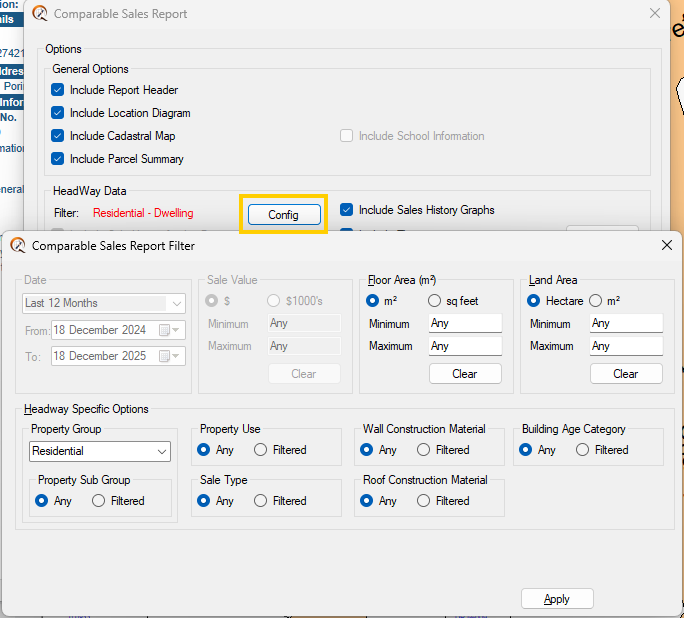
The Config button opens the Sales Filter form, allowing you to refine which sales appear in your report.
- 🔹 Date – Choose from the drop-down list or set custom date ranges.
- 🔹 Sale Value – Set minimum and maximum sale values.
- 🔹 Floor Area – Filter dwellings by specific floor areas.
- 🔹 Land Area – Limit results to selected land sizes.
- 🔹 Headway Options – Search by property type, including sub-groups.
- 🔹 Sale Type – Identify true market sales only.
Additional General Options
- ● Restrict Reporting Area – Set the radius in kilometres.
- ● Graphic Resolution – Adjust depending on your printing capabilities.
💡 Use tick boxes for each option to customise your report. Highlighted fields in the Config dialog make selection faster and more visual.
Please like this page: